Your calm money calendar

Every bill.One clear view.

See what is due, get reminded before it matters, and keep every payment beautifully organized—in one simple place.

Download on theApp Store
Smart reminders Multi-currency Household sharing
Bill Reminder analytics dashboard showing monthly bill spending
Bill Reminder invite-only household sharing screen
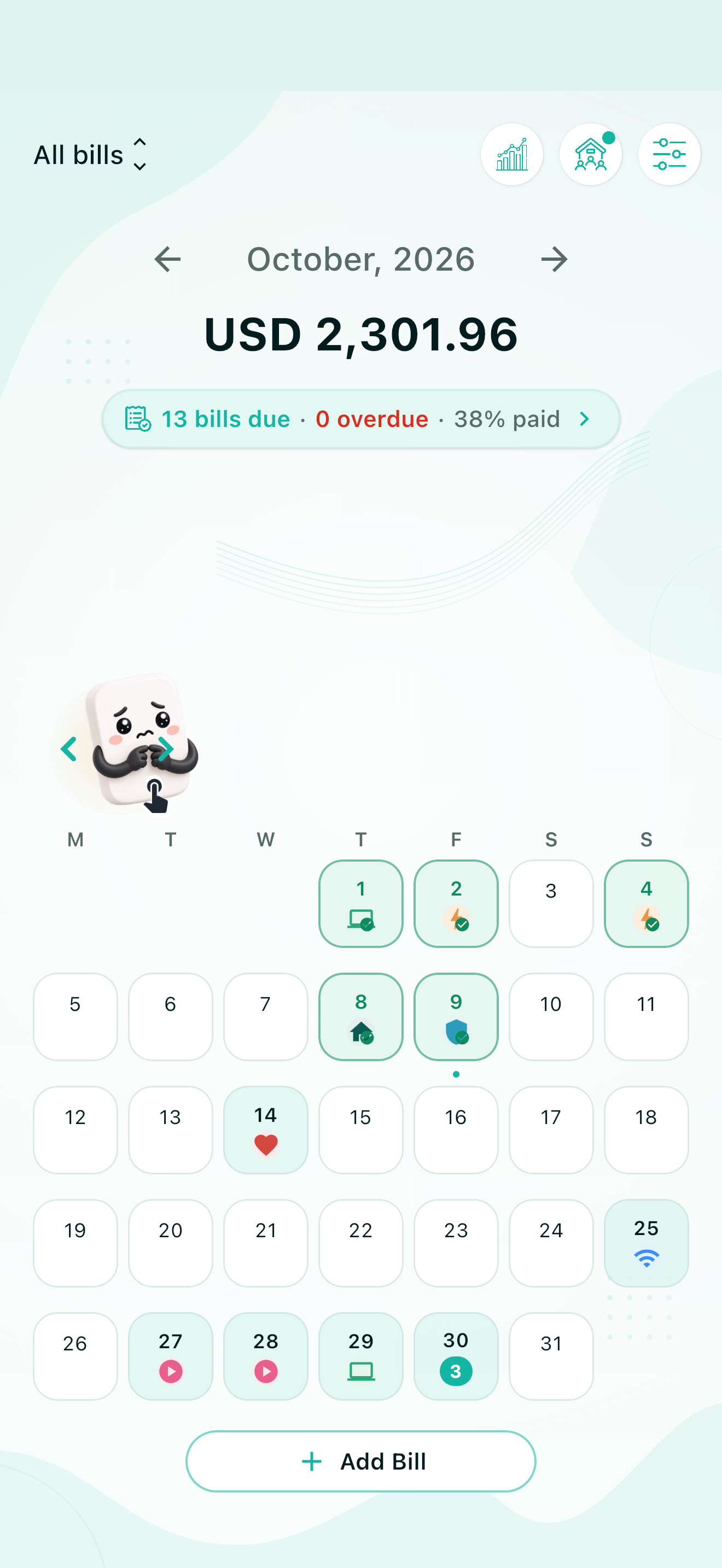
Bill Reminder monthly calendar showing payment due dates
17 bills dueAll in one month
PaidRight on time
Reminder set · 3 days before
Scroll to explore
01 · The idea

Money admin should feel lighter.

Bill Reminder turns scattered due dates, subscriptions, household expenses, and payment notes into one calm visual system.

From scattered to simple

Turn bill chaos into one calm rhythm.

Dates, amounts, reminders, and payment status finally speak the same language.

With Bill Reminder
August 202611 bills due
Month totalAED 5,417.70
RentAug 12AED 4,200Ready
ϟElectricityAug 8AED 2873 days
InternetAug 29AED 320Set
01

See itA visual month at a glance

02

Plan itSmart reminders, your timing

03

Clear itA tidy history when paid

Bill Reminder at a glance

What is Bill Reminder?

Bill Reminder is a mobile finance app that helps individuals and households track bills, payment due dates, reminders, currencies, and payment history from one clear monthly view.

Who is it for?
Individuals and invite-only households that want one shared view of upcoming bills.
What does it track?
Bill names, amounts, due dates, categories, reminder timing, payment status, and history.
How do reminders work?
Choose how many days before a due date to be notified and set the time that suits you.
Does it support currencies?
Yes. Each bill keeps its original currency while the app maintains a clear primary view.
Is an account required?
No. Guest mode lets you begin immediately; signing in enables account-based features.
Can households share bills?
Yes. Members can coordinate shared due dates, responsibilities, and payment updates.
02 · Inside the app

Designed for a quick glance.
Built for the whole month.

Move from the big picture to one specific payment without losing context.

Bill Reminder monthly calendar
Bill details and payment history
Monthly bill analytics
Upcoming bills list
Household sharing onboarding
03 · Features

Everything you need.
Nothing you don’t.

Built to answer three questions instantly: what is due, when is it due, and what has already been paid?

01Your command center

See the entire month without doing the math.

Dates, categories, paid status, and monthly totals come together in one visual calendar.

  • Color-coded categories
  • Monthly due total
  • Tap any day for details
02Insights

Know where the month is going.

Understand your paid, upcoming, and forecast totals at a glance.

03Smart reminders

A reminder that arrives when it helps.

Choose how early and what time each nudge should arrive.

04Multi-currency

Original currency.
One clear total.

Track every bill naturally, wherever it comes from.

05Payment history

Paid, recorded, done.

Keep a clean timeline of every completed payment.

Household sharing onboarding
AMSK✓ Shared bill updated
04 · Better together

One home.
One clear view.

Share recurring costs with the people you live with, split responsibilities, and keep everyone aligned.

  • Shared billsEveryone sees the same due dates and updates.
  • Clear responsibilityKnow who is taking care of each payment.
  • Private invitesYour household stays invite-only.
05 · Questions, answered

Start with confidence.

Clear, practical answers about reminders, guest mode, shared households, preferences, and your data.

Getting started
01Guest modeCan I begin without creating an account?+

Yes. Continue as a guest and start organizing bills immediately. Sign in when you want account-based features such as household sharing or access tied to your signed-in identity.

Helpful tip: If you expect to change devices, signing in is the safer choice for account-backed access.
02PreferencesWill the app match my language and theme?+

The app follows your device language automatically when it is supported and uses English as the fallback. Theme starts on System, so light and dark mode follow your device until you choose a different theme manually.

Everyday use
03NotificationsHow do bill reminders work?+

Choose how many days before a due date you want to be notified and select your preferred reminder time. Notifications must be allowed for Bill Reminder in your device settings.

Example: A bill due Friday with “3 days before” selected will be scheduled for Tuesday at your chosen time.
04CurrenciesCan I organize bills in different currencies?+

Yes. Each bill keeps its selected currency, while your default currency gives the rest of the app a consistent primary view. You can update the default currency from Settings.

05HouseholdsWhat is shared with household members?+

A household keeps shared bills, due dates, responsibilities, and payment updates visible to its members. Access is invite-based, and an account can belong to one household at a time.

Private by design: Someone needs a valid household invite code before they can join.
Account & privacy
06New devicesWhat should I do before changing or reinstalling?+

Sign in before moving to another device if you want bills associated with your account. Guest mode is ideal for trying the app, but it should not be relied on as your cross-device recovery method.

07Data controlsCan I permanently remove my information?+

Yes. Guest users can remove all app data, while signed-in users can use the account-deletion option in Settings. Because deletion is permanent, the app asks for confirmation before continuing.

Your month, finally under control

Stay ahead of every bill.
Effortlessly.

Download Bill Reminder and turn the next due date into one less thing to think about.

Download on theApp Store